Both teams
Both teams side by side, lined up by role so each lane faces its opponent.
Champions, levels, K/D/A, CS, items, runes and summoner spells, updated within about a second of anything changing in your game.
The League scoreboard, live on stream
Give them the whole scoreboard. Tabline puts League's Tab screen on your Twitch stream, so viewers can check every build, every timer and every death, and have a lot more to say about it.
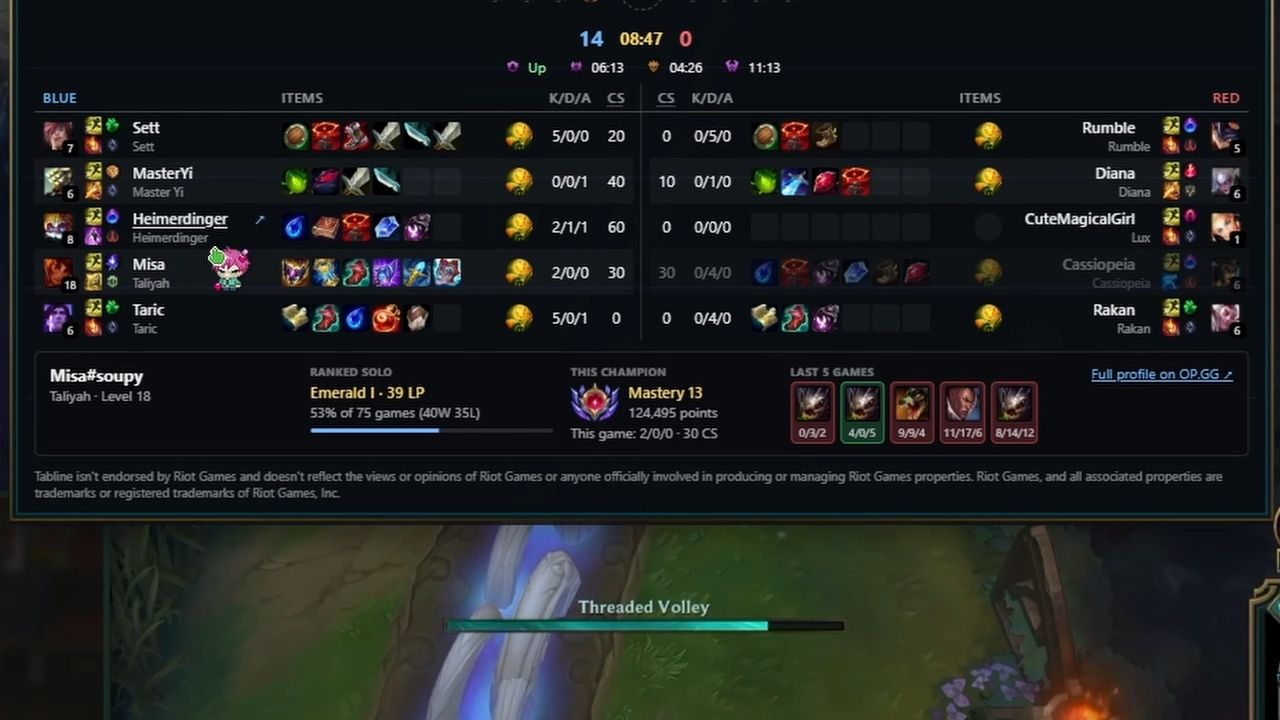
Both teams side by side, lined up by role so each lane faces its opponent.
Champions, levels, K/D/A, CS, items, runes and summoner spells, updated within about a second of anything changing in your game.
Dragons and Void Grubs are added as each team takes them, and the Dragon Soul once it's decided.
Spawn timers count down for Grubs, Herald, Dragon, Elder and Baron, so viewers know what's coming next.
Point at any item, rune, summoner spell or objective and a card explains it: its stats, its cost and what it does, in plain words.
Try it now: hover an item on the board.
Hover a player for their solo queue rank, mastery on the champion they're playing and their last five games, from Riot's official API.
They switch on once Riot approves Tabline's key, and the streamer can turn them off.
A small card at the top of the video keeps your record for the day: wins and losses, your streak, your last games and your averages.
A second account keeps its own record, so a smurf's games never mix into your main's.
When the game ends, viewers get two minutes to give a thumbs-up to the other nine players, on cards that look like League's own end-of-game screen. Click a card to try it.
Coming soon: players you've met before show their thumbs-ups from those games, and streamers who use Tabline get a tag that links to their channel.
Sample data, not a real game.
From your game to your viewers in about a second.
While you play, the game keeps its live data on your PC. It's the same data behind the in-game scoreboard.
Tabline Companion, a small Windows app, reads that data and builds the board. It never changes the game.
The board goes to your channel through Twitch's extension system, within about a second of anything changing.
The Tabline extension draws the board over your stream whenever a viewer hovers the video. They install nothing.
Four steps, about five minutes. You need Windows 10 or 11, League of Legends and a Twitch channel.
The free Windows app that sends your game to the board. When it opens, sign in with Twitch and choose your League region.
Download for WindowsThis opens Tabline on Twitch. Log in with your streaming account, then click Install.
Install on Twitch (opens in a new tab)On the same page, click Activate, then Set as Overlay 1. Twitch shows one video overlay at a time, so this takes the place of any other overlay extension you have on.
To find it again later: your Creator Dashboard, then Extensions, then My Extensions.
Leave Tabline Companion running. The board comes on when your game starts and goes away when it ends. To see what viewers see, open your channel in a private window and point at the video.
Viewers on desktop see the board. Twitch doesn't show video overlay extensions on mobile.
Tabline is free and has no code-signing certificate yet, so Windows can't tell who made it. The download page has the full steps and a way to check the file.
Tabline follows Riot Games' developer policies. In practice:
That's all of it. Download Tabline Companion, add the extension on Twitch (opens in a new tab), and you're on air in a few minutes.